MP3ファイルへの変換方法(iTunes編)
tag:webongaku.com,2010:/mp3//13
2009-12-14T17:00:48Z
iTunesを利用して、CDからMP3ファイルに変換する方法や、WMA→MP3に変換する方法を紹介
Movable Type 3.2-ja-2
MP3ファイルへの変換方法
tag:webongaku.com,2006:/mp3//13.103
2006-07-10T16:08:54Z
2010-01-22T17:33:04Z
こちらでは、CDやWMAなどの音声ファイルを、MP3ファイルに変換する方法を、ご...
webon
比較的、簡単にできるフリーソフト「iTunes」のプレイヤーを使用して、iPodや携帯オーディオ、またはホームページでの音楽配信に利用できる、MP3ファイルを作成する方法を紹介していきます。
■まずはiTunesプレイヤーをゲットしよう! (iTunes for Mac & Windows)
iTunesはNo.1 ミュージックストアを楽しめる、音楽再生ができる無料ソフトです。
iTunes Music Storeで楽曲を試聴したり、購入出来るiTunesの公式フリーソフトなんですが、このソフトを使用してMP3ファイルを作成する方法を紹介します。
まず初めに、このiTunesの最新版をダウンロードしましょう。
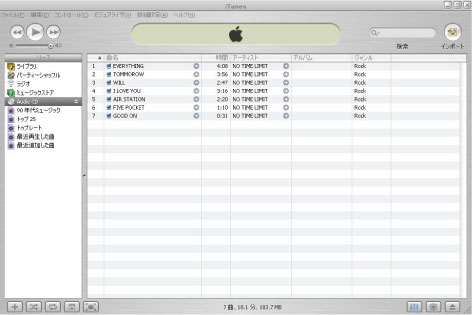 ■「iTunes」ソフトのダウンロード画面 (無償)http://www.apple.com/jp/itunes/download/
こちらのサイトから、メールアドレスを入力して、ソフトをダウンロードしてください。
]]>
MP3ファイルの作成手順(設定)
tag:webongaku.com,2006:/mp3//13.104
2006-07-10T16:16:11Z
2009-12-14T16:21:15Z
では、早速、iTunesを使用して、MP3ファイルに変換するために初期設定をしま...
webon
■iTunes 8.1以降の場合
1. iTunesを起動してください。
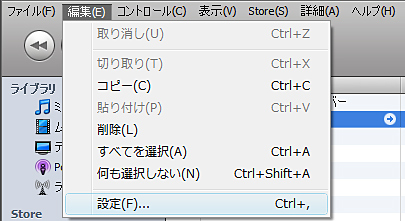
2. メニューの「編集」→「設定」を選択してクリック。
■「iTunes」ソフトのダウンロード画面 (無償)http://www.apple.com/jp/itunes/download/
こちらのサイトから、メールアドレスを入力して、ソフトをダウンロードしてください。
]]>
MP3ファイルの作成手順(設定)
tag:webongaku.com,2006:/mp3//13.104
2006-07-10T16:16:11Z
2009-12-14T16:21:15Z
では、早速、iTunesを使用して、MP3ファイルに変換するために初期設定をしま...
webon
■iTunes 8.1以降の場合
1. iTunesを起動してください。
2. メニューの「編集」→「設定」を選択してクリック。
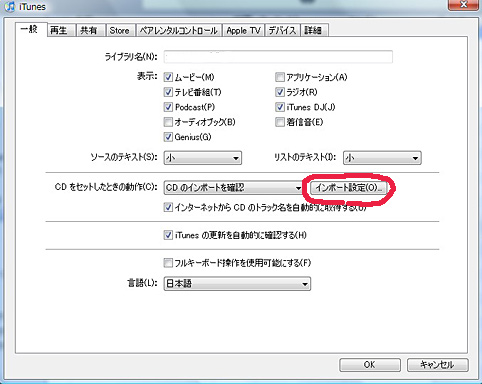
3. 「一般」タブの「CDをセットしたときの動作」から、「インポート設定」をクリックしてください。
 4. インポート方法にて「MP3エンコーダ」を選択して「OK」をクリックしてください。
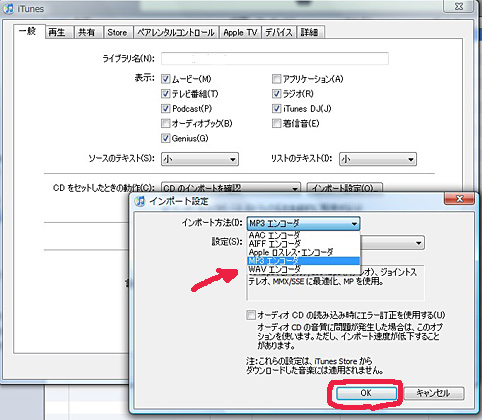 以上で設定が完了です。
*ちなみに、この初期設定で、「AACエンコーダー」「WAVエンコーダー」にすると、AACファイルや、WAVファイルに変換する事ができます。
以上で設定が完了です。
*ちなみに、この初期設定で、「AACエンコーダー」「WAVエンコーダー」にすると、AACファイルや、WAVファイルに変換する事ができます。
■iTunes 8.1以前の場合
1. iTunesを起動してください。
2. メニューの「編集」→「設定」を選択してクリック。
3. 「詳細」タブの「インポート」をクリックして、インポート方法にて「MP3エンコーダ」を選択します。
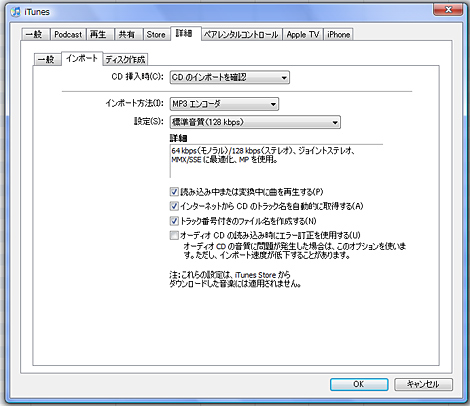
4. さらにインポートタブの「設定」のセレクトボックスの中から「標準音質(128kbps)」などを選択。
5. 「OK」をクリックして設定を保存しましょう。
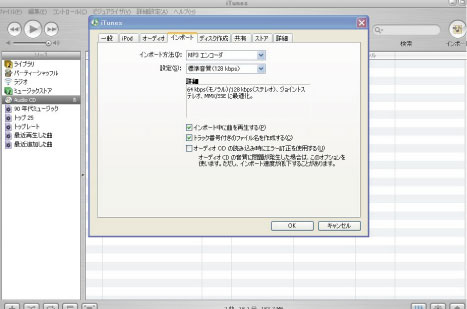 以上で設定が完了です。]]>
CDの楽曲をMP3に変換する場合
tag:webongaku.com,2006:/mp3//13.105
2006-07-10T16:18:41Z
2009-12-14T16:38:15Z
1. MP3ファイルに変換したい楽曲が入った、CDをパソコンに挿入します。 2....
webon
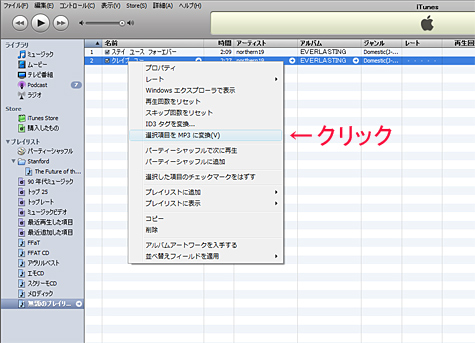
3. では次に、変換したい楽曲を選択して、「右クリック」→「選択項目をMP3に変換」を選択するとMP3に変換されます。 (* iTunesのバージョンによっては、「MP3バージョンを作成」と表示されます)
以上で設定が完了です。]]>
CDの楽曲をMP3に変換する場合
tag:webongaku.com,2006:/mp3//13.105
2006-07-10T16:18:41Z
2009-12-14T16:38:15Z
1. MP3ファイルに変換したい楽曲が入った、CDをパソコンに挿入します。 2....
webon
3. では次に、変換したい楽曲を選択して、「右クリック」→「選択項目をMP3に変換」を選択するとMP3に変換されます。 (* iTunesのバージョンによっては、「MP3バージョンを作成」と表示されます)
4. または、変換したい楽曲の曲名をドラッグして、iTunesプレイヤーの左サイドメニューの上にある「ライブラリ」の上に乗せると、MP3ファイルへの変換が始まります。
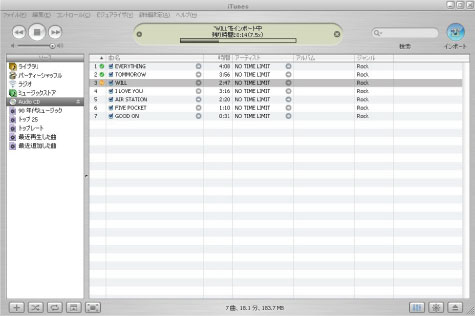
5. 変換された楽曲は「My Documents」→「My Music」→「iTunes 」→「iTunes Music」のいずれかのフォルダの中に、自動的に保存されます。
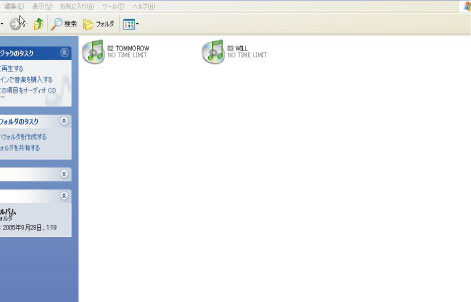 以上で、MP3ファイルの変換&作成が完了です。お疲れさまでした。]]>
プレイリストの楽曲をMP3に変換する場合(WMA→MP3)
tag:webongaku.com,2006:/mp3//13.106
2006-07-10T16:20:46Z
2010-01-22T17:40:21Z
●例えば、「Happy Ending」という、iTunesのリスト曲を、MP3に...
webon
●例えば、「Happy Ending」という、iTunesのリスト曲を、MP3に変換したい場合
以上で、MP3ファイルの変換&作成が完了です。お疲れさまでした。]]>
プレイリストの楽曲をMP3に変換する場合(WMA→MP3)
tag:webongaku.com,2006:/mp3//13.106
2006-07-10T16:20:46Z
2010-01-22T17:40:21Z
●例えば、「Happy Ending」という、iTunesのリスト曲を、MP3に...
webon
●例えば、「Happy Ending」という、iTunesのリスト曲を、MP3に変換したい場合
CDからではなく、リストにある楽曲(WMAファイルや、AACファイルなど)を、MP3ファイルに変換したい場合です。
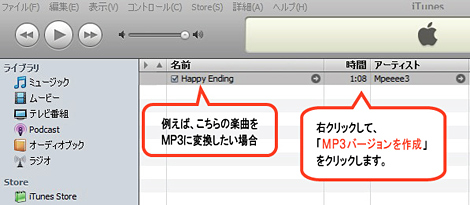
1. まずは、上の画像のように、変換したい楽曲を選択して、「右クリック」→「MP3バージョンを作成」を選択してください。
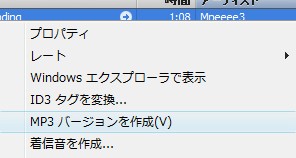 ↑この様なダイアログが表示されます。
2. 変換されると、先ほどの楽曲の下に、MP3バージョンが並んで表示されます。
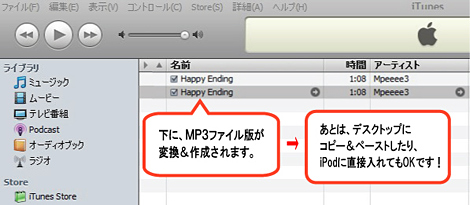
3. 変換されたMP3ファイルの保存先を表示する方法は、まず楽曲名を選択。
「右クリック」→「プロパティ」を選択すると、「場所」という項目で表示されますので、そちらを参照してください。
4. あとは、そのままiPodに楽曲を入れたり、または、曲名をドラッグし、デスクトップにそのままペーストして保存する事も出来ます。
 ↑デスクトップにペーストされたMP3ファイルです。
これでMP3ファイルへの変換が完了です。
*パソコンのフォルダにあるWMAファイルや、AACファイルなどを、変換したい場合は、WMAファイルをドラッグして、iTunesのリストに追加してください。その後、MP3ファイルに変換してください。
この様に、iTunesを使えば、比較的お手軽に変換できますので、ぜひお試しください。
(*バージョンによっては、使えない方法もありますので、ご了承ください)
最後までお付き合いいただき、ありがとうございました。
今後ともよろしくお願いいたします。
●その他の人気まとめページ
>> 0円で聴き放題の音楽配信サイト一覧
]]>
その他の特集記事
tag:webongaku.com,2006:/mp3//13.107
2006-07-10T16:24:12Z
2009-12-14T17:00:48Z
国内の音楽配信サイト ウェブで音楽が配信出来るFlash MP3 Player ...
webon
国内の音楽配信サイト
ウェブで音楽が配信出来るFlash MP3 Player
ブログで始めるCDレビュー
音楽サイトで学ぶWeb2.0
音楽配信×CDの流通
インディーズバンド活動Navigator
>>メインブログへ
ウェブ音
最新のJ-pop楽曲の試聴や、無料が音楽PVが視聴できるサイトを紹介しています!]]>